Outages don’t wait for a good time, and how your team responds in the first ten minutes often matters more than the tooling you bought to prevent them. This guide covers the incident management practices that actually move the needle in 2026 — severity classification, swarming versus tiered escalation, communication cadence, blameless reviews, and where AI-assisted triage genuinely helps versus where it’s just marketing.
Why Incident Management Still Trips Up Mature IT Shops
Plenty of organizations have an incident process on paper. Fewer have one that survives contact with a real Severity 1. The gap usually isn’t a missing tool — it’s ambiguity about who decides priority, who talks to customers, and when a routine ticket becomes a major incident needing a different playbook entirely.
ITIL 4 treats incident management as a practice built around restoring service as fast as possible, not around finding root cause in the moment — that’s what problem management is for. Keeping those two disciplines separate is one of the simplest fixes we see in maturity assessments: teams that chase root cause mid-outage almost always extend their own MTTR.
Getting Severity and Priority Right
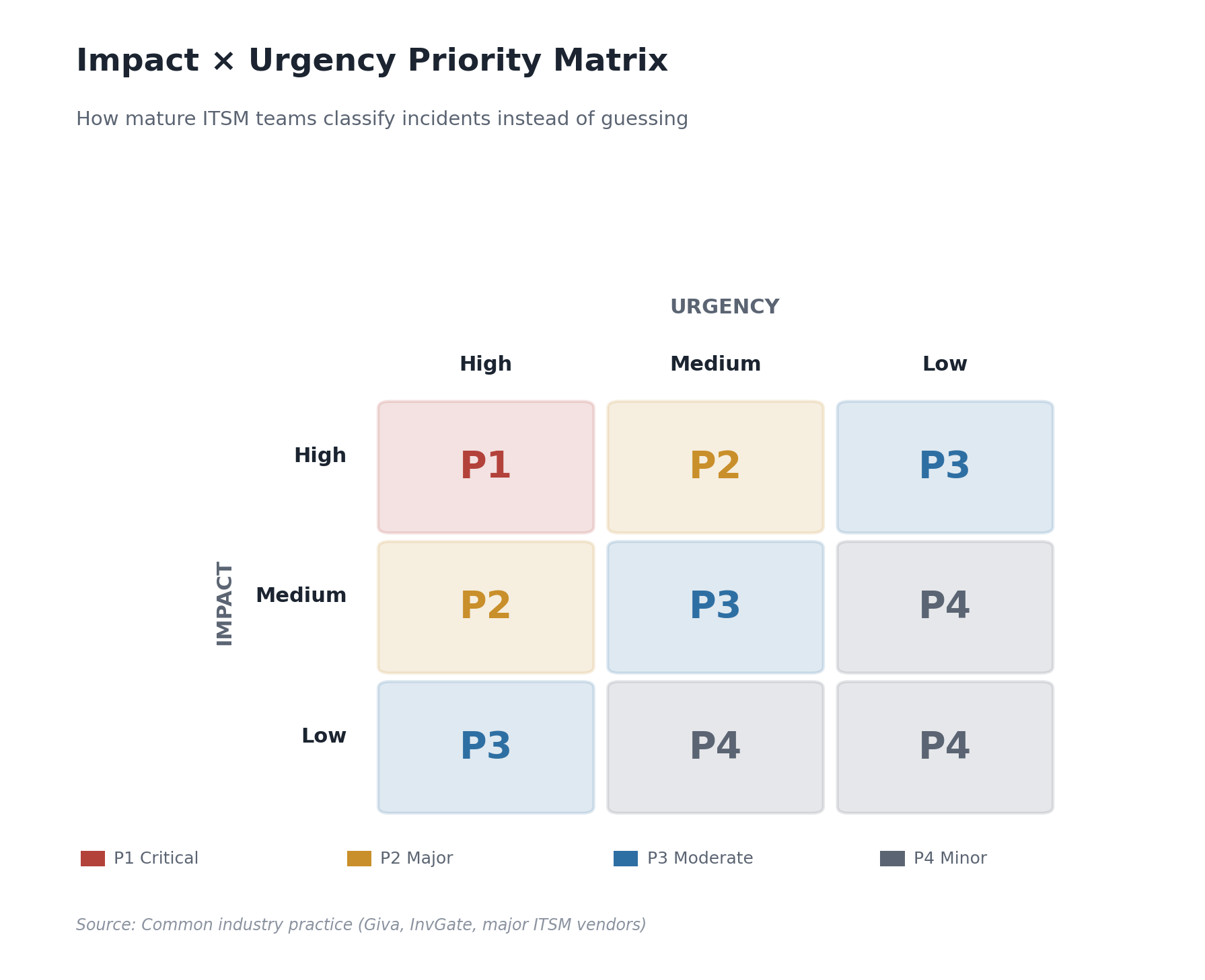
Most service desks blend two variables that ITIL keeps distinct: impact (how much of the business is affected) and urgency (how fast the impact will get worse). Multiply a three-tier impact scale by a three-tier urgency scale and you get a standard 3×3 priority matrix that sorts most incidents into four or five bands — P1 through P4, sometimes a P5 for cosmetic issues. The matrix matters because it forces a conversation about business impact instead of letting whoever escalates loudest set the priority.
A workable severity scale, drawn from common industry usage (Giva, InvGate, and most major ITSM vendors converge on something close to this):
- SEV1 / P1 — Critical. Complete outage, security breach, or revenue-impacting failure; all hands, immediate response.
- SEV2 / P2 — Major. Significant degradation or an outage hitting a subset of customers; painful workarounds may exist.
- SEV3 / P3 — Moderate. Noticeable disruption, business continues, fix follows standard queue prioritization.
- SEV4 / P4 — Minor. Cosmetic or low-impact issues, batched into normal ticket work.
The trap we see constantly in assessments: organizations define the matrix nicely in a policy document and never train dispatchers or on-call engineers to apply it consistently. Priority drift — everything tagged P1 or P2 because nobody trusts the lower tiers to get attention — quietly destroys the value of the whole system. If a large share of your tickets sit at the top two priorities, that’s usually a classification training gap, not a genuine surge in critical work.
Tie Severity to Actual Response Commitments
A severity level only means something if it changes behavior — who gets paged, how fast, what communication kicks in. If a P1 and a P3 trigger the same response, your matrix is decorative. SLA targets attach here: P1 means phone-tree paging and a bridge within minutes, P3 means it lands in tomorrow’s queue.
Major Incident Management: A Different Process, Not Just a Bigger Ticket
A major incident isn’t a regular incident that got escalated — it needs its own process with distinct roles, because normal ticket workflows aren’t built for real-time coordination under pressure. The roles that show up consistently across incident response guidance from Atlassian, PagerDuty, and Rootly include:
- Incident commander — owns the incident end to end and has authority to make calls, but isn’t necessarily the person fixing the problem.
- Technical lead — drives diagnosis and remediation while the commander manages process.
- Communications lead — owns status page updates and executive updates, so responders aren’t context-switching into writing customer messages.
- Scribe — keeps a timeline. Sounds bureaucratic until you’re three hours in and nobody remembers what was tried at hour one.
- Subject matter experts — pulled in as needed, not sitting on every bridge by default.
Splitting these roles out is one of the highest-leverage changes we recommend to clients whose major incidents currently run through one overworked engineer trying to fix the system, message the CEO, and update the status page at once. It isn’t about adding process weight — it’s making sure critical work doesn’t get dropped because one person is doing five jobs.
Swarming vs. Traditional Tiered Escalation
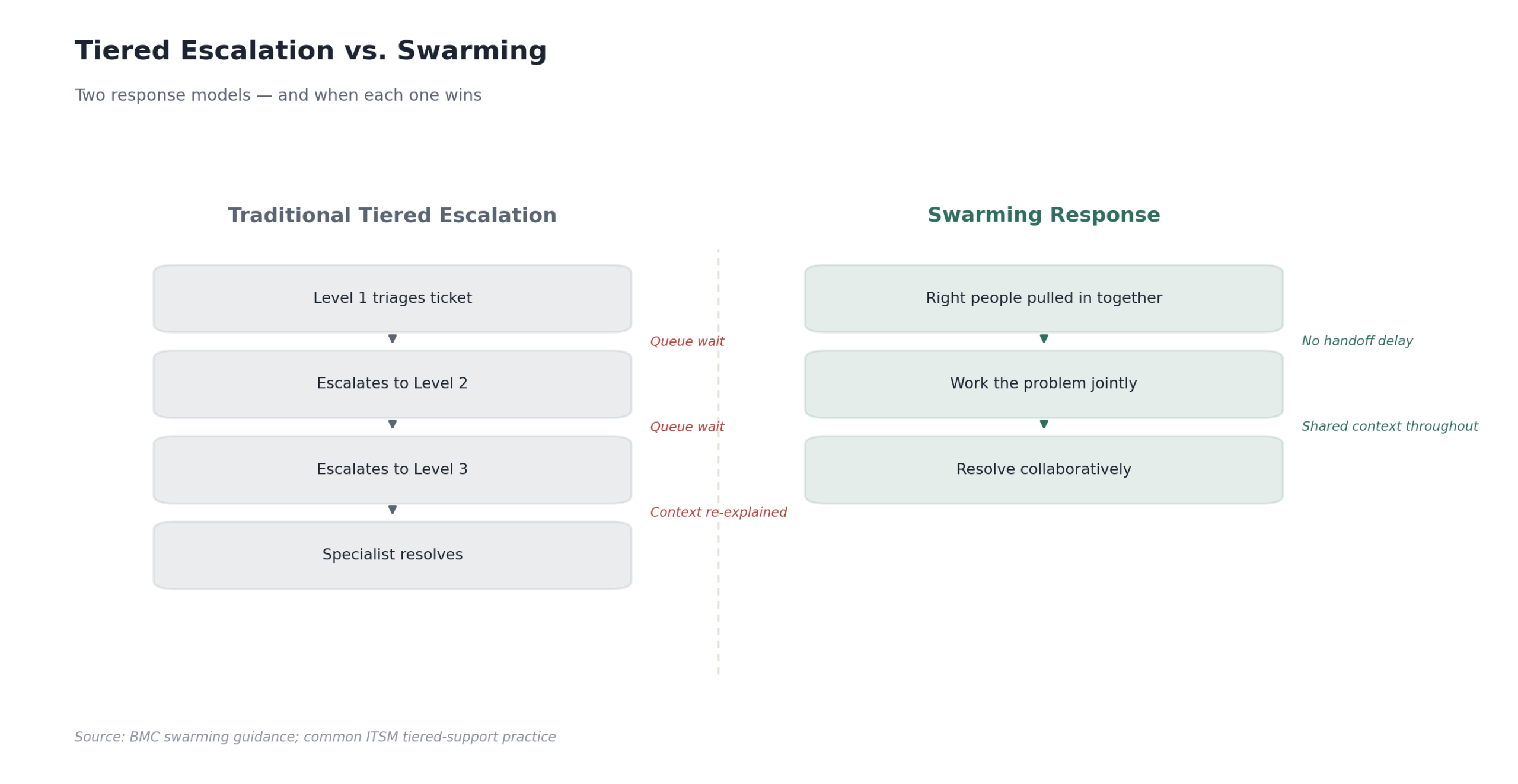
Tiered support — Level 1 triages, Level 2 digs deeper, Level 3 owns the hard stuff — has been standard for decades and still works fine for high-volume, well-understood ticket types. The problem shows up on anything ambiguous: tickets bounce between tiers looking for whoever can actually solve them, knowledge stays siloed inside each tier, and every handoff adds queue time even when nobody’s actively working the problem.
Swarming flips that structure. Instead of routing a ticket up a chain, you pull the right mix of people — regardless of tier — into a shared space and work it together until it’s resolved. BMC’s own swarming guidance describes three flavors: a Severity 1 swarm for immediate all-hands response, a “local dispatch” swarm convening every 60–90 minutes to clear escalated cases together, and a backlog swarm meeting roughly daily on the gnarlier tickets nobody’s cracked yet. One practitioner quoted in that material said swarming doubled their product knowledge in a year, just from sitting alongside senior resolvers on live problems instead of reading a knowledge base article afterward.
The honest tradeoff: swarming asks more of your senior people’s calendars, and it doesn’t replace tiered structures outright — most mature shops keep tiered support for routine volume and reserve swarming for anything ambiguous, cross-domain, or high severity. Swarming every password reset wastes your best engineers’ time; tiering your way through a multi-system outage wastes your customers’ patience.
Communicating During an Outage (Internally and Externally)
Silence erodes trust faster than the outage itself, usually. PagerDuty’s guidance on status pages puts a number on it: acknowledge a customer-impacting issue within 10 to 15 minutes of detection, even if all you can say is “we’re aware and investigating.” For a major outage, a good baseline cadence is an update roughly every 30 minutes, even if it’s just “still working it, next update by [time].” Committing to a specific next-update time is what actually reduces the flood of “any update?” messages — people tolerate a slow fix far better than an information vacuum.
Most communication frameworks move through the same stages: investigating → identified → monitoring → resolved. Stating the stage tells stakeholders where you are without requiring technical detail. Keep public-facing updates in plain language — no stack traces, no internal codenames, no jargon that reads like an internal Slack thread leaked to customers by accident. The communications lead role exists precisely so the person fixing the problem isn’t also translating it for three audiences at once.
Post-Incident Reviews That Don’t Turn Into Blame Sessions
Google’s SRE practice frames the postmortem philosophy simply: it’s a learning exercise, not a performance review, starting from the assumption that everyone involved acted reasonably given the information they had at the time. That’s a practical mechanism, not a soft HR sentiment. The moment people worry a postmortem might get them in trouble, they stop being honest about what they tried and what almost made things worse — and a postmortem built on a sanitized version of events won’t catch the real failure mode.
A few things worth stealing from that approach regardless of your organization’s size. Set clear triggers for when a postmortem is mandatory — user-visible downtime past a threshold, any data loss, an on-call engineer intervening manually, or resolution time blowing past what your SLA assumes. Don’t leave it to individual judgment whether an incident “deserves” a review; that’s exactly how the uncomfortable ones get skipped.
Have someone senior review the document before it circulates, not to police tone, but to confirm the action items are specific and someone’s named against each one. A postmortem with no owned follow-up is just a well-documented complaint. Make the habit cross-functional rather than an engineering-only ritual — Google describes running “reading clubs” and circulating standout postmortems broadly, which normalizes talking about failure instead of filing it away.
Where Automation and AI Actually Help
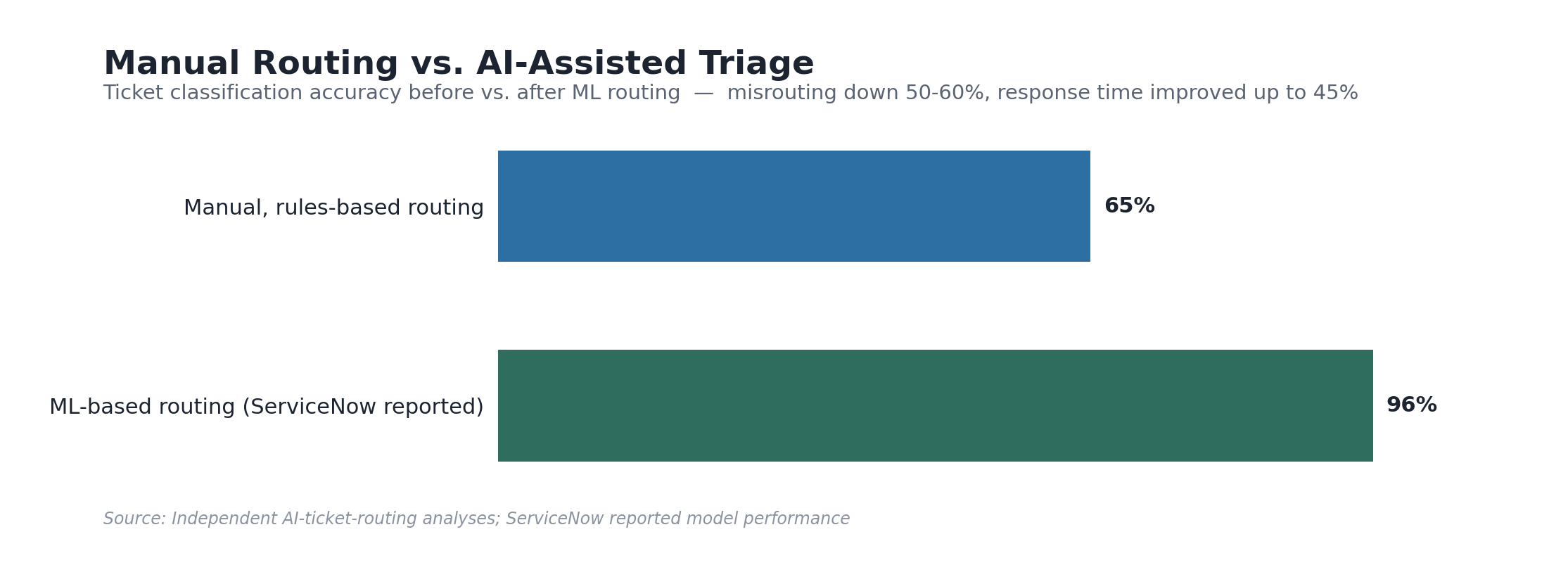
Auto-ticket creation from monitoring and observability tools has been standard practice for a while — the interesting shift now is in triage and routing. Independent analyses of AI-assisted ticket classification report accuracy climbing from the 60–70% range typical of manual, rules-based routing into the high 80s and mid-90s for machine-learning-based classification, with vendors including ServiceNow reporting automated ML models reaching around 96% accuracy after continuous retraining on their own data. The knock-on effect is fewer misroutes, and every misrouted ticket is a queue delay before the clock even starts on real diagnosis.
Where this pays off fastest is the boring, high-volume tier: categorizing tickets, routing to the right queue, flagging duplicates, surfacing similar past incidents so an engineer isn’t starting from a blank page. It still needs a human hand on judgment calls — is this really a P1, does it need a major incident bridge. Treat AI triage as a fast, well-informed first pass a human confirms, not a replacement for the on-call engineer’s judgment.
Getting this right means looking at the whole incident lifecycle together — classification, escalation, communication, review — rather than optimizing one stage in isolation. That’s the thinking behind Desqcon’s AEIOU framework: Automation, Edification, Integration, Operations, and User experience as five lenses on the same process, not five separate initiatives. Automation without edification means your team doesn’t understand why the tool routed something the way it did; integration without attention to user experience means your status updates are technically accurate and unreadable to the person waiting on them. Working vendor-neutral across ServiceNow, BMC Helix, and Atlassian lets us treat your incident workflow as a process problem first and a tooling problem second — usually where the real fix is hiding anyway.
Metrics Worth Watching (and a Few Worth Ignoring)
MTTA (mean time to acknowledge) and MTTR get treated as interchangeable, and they’re not. MTTA tells you how fast your alerting and paging actually work. MTTR is murkier — depending on who’s using the term, it can mean time to repair, time to full recovery, time to complete resolution including prevention, or time to functional restoration. Agree internally on which definition you’re using before it goes on a leadership dashboard, or you’ll compare numbers that were never measuring the same thing.
As a rough orientation, IT and security teams generally treat anything under an hour as a strong MTTR, with the real target being as close to zero as operationally realistic — though “good” depends heavily on your environment and whether you’re measuring an internal tool outage or a customer-facing one. Watch trend lines more than absolute numbers: a rising MTTA over successive quarters is often the earliest signal that on-call fatigue or alert noise is creeping in, well before it shows up anywhere else.
Where to Start If Your Process Is a Patchwork
If your incident process was assembled over several years by several tool owners, it probably has all the individual pieces — a priority matrix somewhere, an on-call schedule, a status page — without them working as one system. That’s normal, and it’s fixable without a rebuild. Most of what’s covered here comes down to alignment rather than new software: classification discipline, the right escalation model, a communication cadence people can rely on, and reviews that generate real fixes instead of paperwork.
If you’re not sure where your incident management practice actually stands, an ITSM maturity assessment focused specifically on incident management is a low-friction way to find out. Desqcon runs these vendor-neutral, whether you’re on ServiceNow, BMC Helix, Atlassian, or some combination — the point is to see your process clearly before deciding what, if anything, needs to change.