
Every ITSM migration starts with a confident kickoff meeting and a target go-live date on a slide. Most of them also hit the same wall a few weeks in: the CMDB is messier than anyone admitted, a critical integration nobody documented breaks silently, and half the team is quietly still working out of the old tool because the new one doesn’t do the one thing they relied on. None of that is inevitable. It’s what happens when a migration is treated as a data export instead of a change management project.
This is the checklist we actually use, built around the two things that consistently make or break a platform switch: not losing data, and not losing the trust of the people who have to use the new system every day.
Why teams migrate in the first place
Nobody migrates an ITSM platform for fun. It’s disruptive, expensive, and risky, which means there’s almost always a forcing function behind the decision. The most common ones we see: a legacy on-prem tool reaching end of life or end of vendor support, licensing costs that no longer match the org’s size, a merger or acquisition forcing two ticketing systems into one, or a genuine capability gap, the old platform can’t support the automation, AI-assisted workflows, or enterprise service management scope the business now needs. Understanding which of these is actually driving your migration matters, because it shapes what “success” means at go-live. A cost-driven migration and a capability-driven migration should not be planned the same way.
The six phases of a real migration
Strip away the vendor-specific terminology and nearly every credible migration framework converges on the same shape. We use six phases, and the two most commonly underestimated are Data Migration and Hypercare, both get compressed when timelines slip, and both are exactly where the expensive mistakes live.
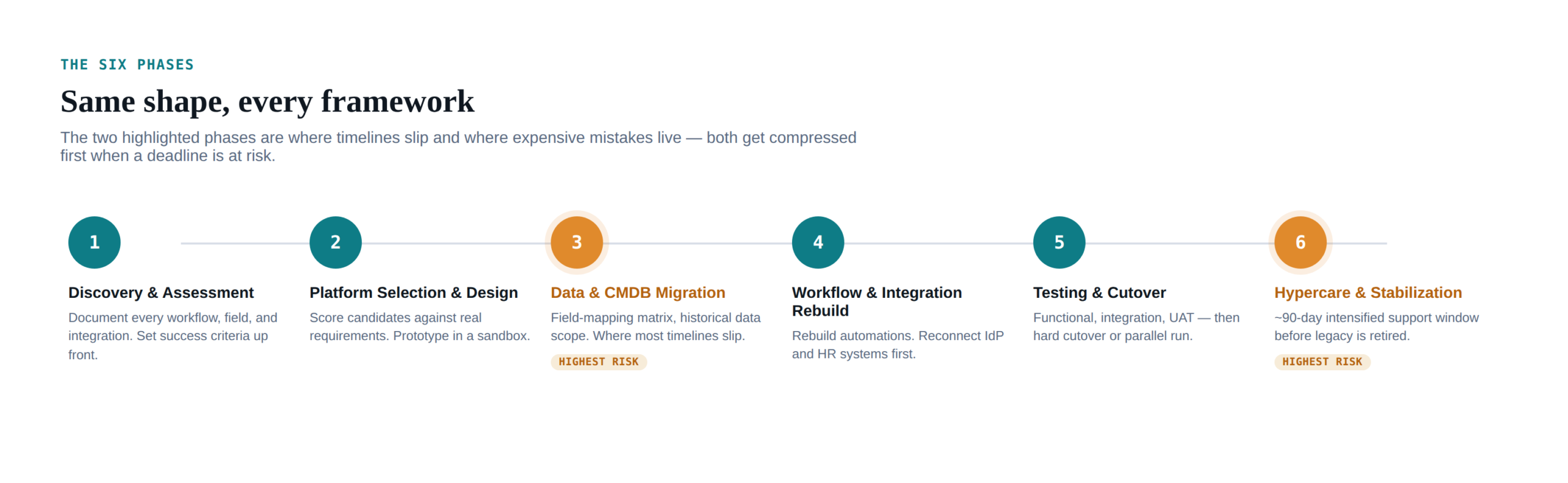
| Phase | What actually happens |
|---|---|
| 1. Discovery & Assessment | Document every workflow, custom field, automation, and integration in the current tool. Set measurable success criteria before anyone touches the new platform. |
| 2. Platform Selection & Design | Score candidate platforms against your actual requirements, not a generic feature checklist. Prototype critical workflows in a sandbox before committing. |
| 3. Data & CMDB Migration | Decide explicitly what historical data moves versus what gets archived. Build and test a field-mapping matrix. This is where most timelines slip. |
| 4. Workflow & Integration Rebuild | Rebuild automations and reconnect integrations, identity provider and HR system first, since they’re the highest-risk connectors to get wrong. |
| 5. Testing & Cutover | Functional, integration, and user-acceptance testing, then a deliberate cutover approach: hard cutover or a parallel-run period. |
| 6. Hypercare & Stabilization | An intensified support window, commonly around 90 days, with daily monitoring before the legacy system is fully decommissioned. |
Where data actually gets lost
“We migrated the tickets” is not the same as “we migrated the data that makes those tickets useful.” The failure pattern is consistent enough across migrations that it’s worth naming directly: teams export the obvious fields, miss the custom fields, attachments, and audit trail history that live around them, and don’t discover the gap until someone needs a record that no longer exists anywhere. Once the legacy system is decommissioned, that gap is permanent.
The CMDB is usually the hardest part of this, for a reason that has nothing to do with the migration tooling: most CMDBs entering a migration are already in worse shape than anyone believes. Configuration item data drifts continuously, reactive, ticket-driven updates can’t keep pace with a changing environment, and a quick pre-migration cleanup typically buys only a month or two of accuracy before decay resumes. Migrating that data as-is doesn’t fix it; it just moves the same inaccuracy into a newer, more expensive system. If the underlying data is untrustworthy, no amount of automation in the migration process corrects for that, it just moves bad data faster.
Where trust actually gets lost
The technical migration can go perfectly and the rollout can still fail, because adoption is a separate problem from data integrity. The most common pattern: agents get trained on where buttons are in the new tool, but not on why the process itself changed, and within a few weeks of go-live, they’ve quietly reverted to old habits, working around the new system rather than through it. A tool swap without a process explanation reads to end users as “the same work, now more annoying,” and that impression sticks.
The antidote isn’t more documentation. It’s presence during the transition: a single, well-communicated point of contact for questions during cutover week, manager-level reinforcement of the new process (not just IT sending an email), and staffed office hours for the first few days rather than a one-time training session people forget by the following Monday.
The checklist
- Build a field-mapping matrix before exporting anything. Every custom field, every picklist value, every relationship, mapped explicitly, not assumed to transfer automatically.
- Decide historical data scope up front. A common, defensible default: migrate open tickets plus the last 12-24 months of closed ones, archive (don’t discard) anything older in a queryable read-only format.
- Inventory every integration before cutover, identity provider and HR/HRIS connections first, since they’re the ones most likely to silently break access for real users on day one.
- Choose your cutover approach deliberately. A parallel run is lower-risk and easier to roll back but costs more and drags longer if there’s no firm end date; a hard cutover is cheaper and cleaner for simpler environments. Regulated or compliance-heavy environments should default to parallel.
- Write the rollback plan before go-live, not during an incident. If cutover goes wrong, know exactly what “reverting” means operationally, and confirm it’s actually executable within your change window.
- Set a firm legacy decommission date at kickoff. Without one, a parallel run has a habit of quietly running for six months instead of six weeks.
- Name an accountable executive sponsor. Migrations that stall usually stall because nobody senior owns unblocking decisions quickly.
- Monitor the right KPIs post-launch, SLA compliance, mean time to resolution, and automation hit rate, tracked against pre-migration baselines, not against a vague sense of “it feels smoother.”
Realistic timelines and cost
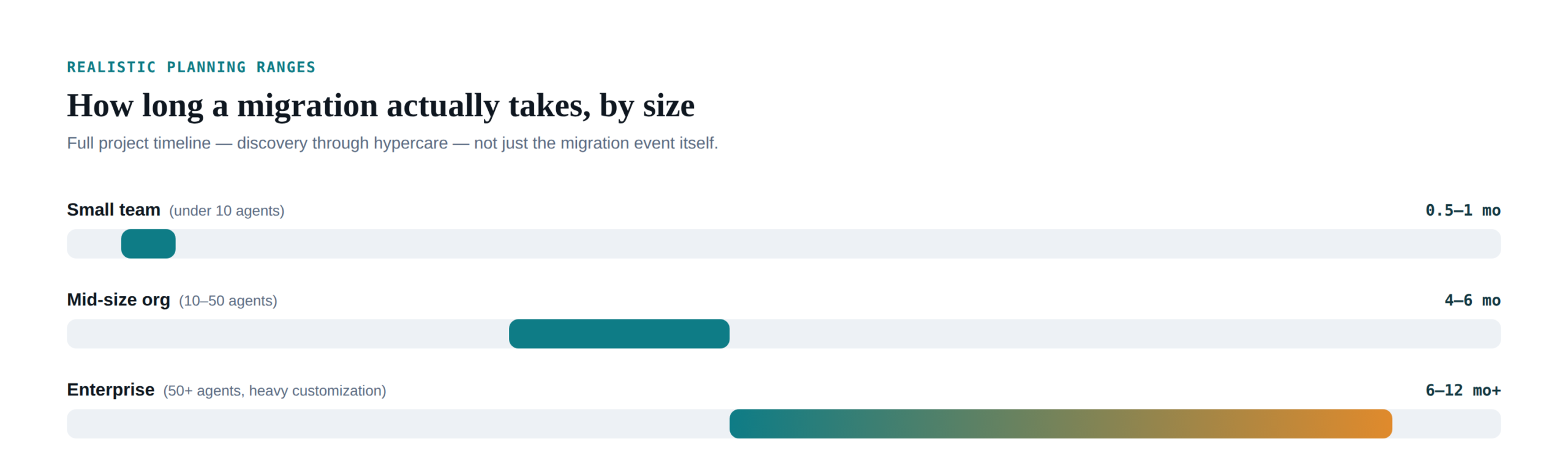
Scale changes everything here, so treat these as planning ranges rather than quotes. A small team (roughly ten agents or fewer) can sometimes complete the core migration event in about a week, with the surrounding project closer to a month. A mid-sized organization (10-50 agents, several hundred to a couple thousand employees) more typically spans four to six months end to end once discovery, testing, and a real hypercare period are included. Enterprise migrations with heavy customization, multiple business units, or regulatory scope regularly stretch past six months, sometimes into a year when rolled out in phases rather than all at once.
On cost, figures vary enormously by platform and scope, but for a mid-market rollout onto a major enterprise ITSM platform, total first-year cost, licensing, implementation services, custom development, and change management combined, commonly lands somewhere in the low-to-high six figures. Compliance-heavy industries (healthcare, financial services) should budget meaningfully above that baseline; the extra validation and audit work is real, not optional overhead.
Frequently asked questions
Should we do a hard cutover or a parallel run?
Parallel runs are lower-risk and give you a rollback option, but only if you set a firm end date, otherwise they tend to drag. Hard cutovers are faster and cheaper but leave less room for error, and suit simpler environments better than complex, highly-customized ones.
How much historical ticket data should we actually migrate?
All open tickets, plus a defined recent window of closed ones, 12 to 24 months is a common, defensible default. Older closed data is usually better archived in a read-only, queryable format than either fully migrated or discarded.
What’s the single most common cause of a failed migration?
Treating it as a data-export project rather than a change-management project. The technical migration succeeding and the organization actually adopting the new system are two separate outcomes, and teams that only plan for the first one are the ones who end up with a shadow-IT workaround culture six months later.
Do we need to clean up our CMDB before migrating, or can we do it after?
Before, if at all possible. Migrating inaccurate configuration data into a new platform doesn’t fix it, it just moves the same inaccuracy somewhere newer and more expensive. A pre-migration cleanup is worth the delay it costs.
If you’re weighing a migration and want a second set of eyes before committing to a timeline, our ITSM Tool Assessment is a practical starting point, and our CMDB Maturity Model guide is worth reading before the data-migration phase specifically. Or get in touch and we’ll help you scope what a realistic timeline looks like for your environment.
Check your own ITSM and ITOM maturity
If this raised questions about where your own organization stands, Desqcon Consulting’s ITSM & ITOM Maturity Assessment gives you a structured, evidence-based read on that. Start with a free trial across one process area, or request the full deep-dive assessment across people, process, tools, automation, AI, and governance.
