Most organizations that set out to modernize their service management stack assume the hard part will be the tool. They shortlist platforms, run demos, negotiate licensing, and set a go-live date. Then, six months in, tickets start falling through the cracks, the CMDB fills up with duplicate records, agents quietly revert to spreadsheets, and leadership asks why the “simple” tool swap turned into a fire drill. This is a known pattern: large-scale change efforts usually fail not because the technology was wrong, but because the transition itself was never designed as a discrete piece of work.
McKinsey’s transformation practice has found that roughly 70 percent of corporate transformations fail to meet their objectives, and the reasons are rarely about picking the wrong software — they’re about sequencing, ownership, and how change lands on the people who live with it. ITSM transitions are a special case: the service desk, incident management, and CMDB sit in the critical path of every other IT function, so a badly run transition doesn’t just delay a project — it degrades service for the whole business while it’s happening.
A genuine ITSM Transition and Transformation Service treats the move off legacy tools as a structured program with its own risk register, not a line item inside a software rollout: baselining where you are, redesigning how work will flow before configuring anything, treating data migration as its own discipline, choosing a cutover approach deliberately, and treating adoption as the real deliverable. This article lays out a practical, phase-by-phase roadmap for doing exactly that.
What Falls Under an ITSM Transition and Transformation Service
Vendor-neutral ITSM consulting and advisory work distinguishes between two things that often get bundled together and shouldn’t be: platform migration and operating model transformation. Platform migration is moving tickets, knowledge articles, workflows, and CIs from Tool A to Tool B. Transformation is the harder work of deciding whether current processes, roles, and governance are even worth carrying into the new environment. Many organizations skip that question and simply rebuild their old, broken process inside a shinier interface — how a modernization project ends up delivering the same complaints in a new skin.
An ITSM Transition and Transformation Service forces that question early: what should the target operating model look like, and only then, what does the new tool need to support it. That ordering changes almost every subsequent decision — what data is worth migrating, what integrations are actually needed, and how much customization is appropriate versus how much process should simply change to fit better-practice, out-of-the-box workflows.
Phase 1: Current-State Assessment and Maturity Baseline
Before any migration plan is drawn up, you need an honest picture of what exists today — not the process as documented, but the process as actually practiced. This phase should produce:
- A process maturity baseline across incident, request, change, problem, and configuration management, scored against a recognized framework rather than gut feel.
- A data quality audit of the CMDB and any adjacent asset or discovery sources, estimating duplicate, stale, and orphaned configuration items (CIs).
- An integration inventory — every monitoring tool, HR feed, discovery tool, and reporting dashboard touching the current ITSM tool, since these get forgotten until they break.
- A stakeholder and pain-point map covering agents, change managers, application owners, and report-consuming executives, so the transition targets real friction, not assumed friction.
This is also where a formal maturity assessment earns its keep. Skipping it doesn’t remove the risk it would have surfaced — it just moves that risk downstream, where it’s far more expensive to fix, a trade-off worth its own section later in this article.
Phase 2: Designing the Target Operating Model
With the baseline in hand, the next step is deciding what “good” looks like before configuring a single workflow in the new platform. This is where transitions quietly go wrong: teams migrate their existing process definitions verbatim because it’s faster, then spend the next two years fighting the same reporting gaps and approval bottlenecks they had before, just inside a new tool.
A target operating model exercise should define, at minimum, process ownership and RACI for each ITSM discipline, a simplified service catalog structure, escalation and priority matrices that reflect actual business impact rather than historical habit, and — critically — how much the organization is willing to customize the new platform versus adapt its process to fit leading practice. Heavy customization is one of the most reliable ways to inherit the same upgrade pain and vendor lock-in that likely motivated the transition in the first place.
Only once this target state is agreed should configuration begin. Configuring first and designing process later is how organizations end up automating a broken workflow.
Phase 3: CMDB and Data Migration — Where Timelines Really Blow Up
Data migration is consistently underestimated, and CMDB data is the worst offender because configuration item relationships, ownership fields, and discovery-sourced attributes rarely map cleanly between tools. Practical guidance that holds up across most migrations:
- Don’t migrate everything. A full historical migration is expensive, slow, and drags legacy data-quality problems into the new system. Migrate active, in-flight work plus a defined set of essential historical records; archive the rest in a searchable read-only store for audit purposes.
- Clean before you move, not after. Deduplicate and retire stale CIs, reconcile ownership fields, and validate relationships in the source system first. Migrating dirty data just relocates the mess.
- Build a field-mapping matrix early and treat it as a living document — mismatches here are the single biggest source of “the new tool is wrong” complaints that are actually mapping errors.
- Don’t forget attachments, audit trails, and reporting continuity. Dashboards and SLA trend lines that reset to zero on go-live day erode confidence in the new platform fast, even when it’s working fine.
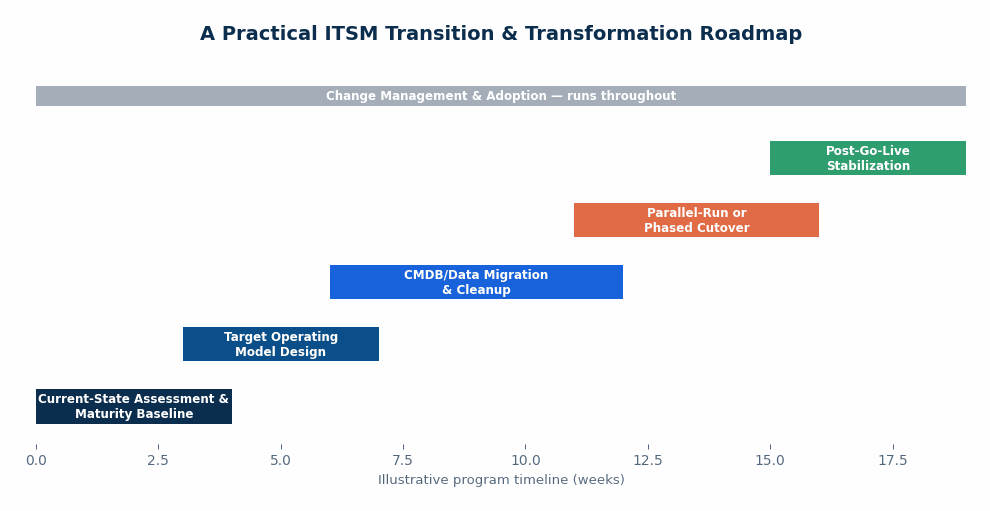
Phase 4: Choosing Your Cutover Strategy — Big Bang, Phased, or Parallel-Run
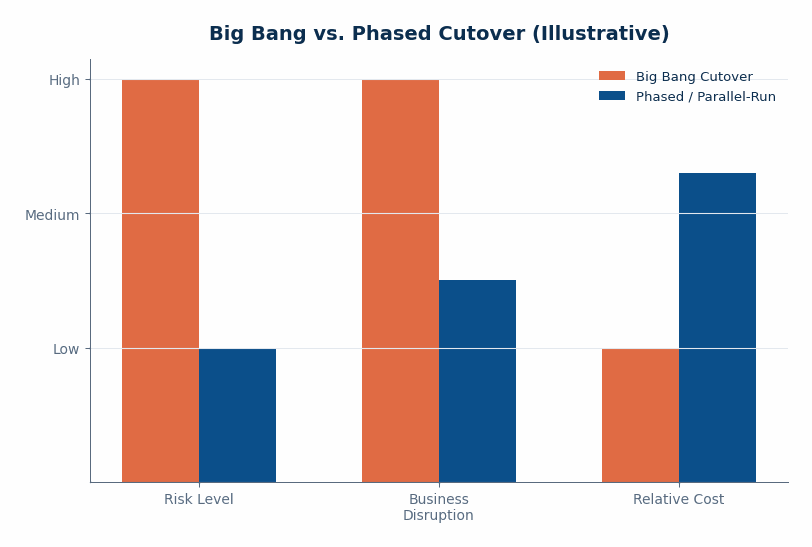
This decision most directly determines whether the business notices the transition happened at all. Three broad options exist, and none is universally right:
- Big bang cutover: everyone moves to the new tool on a single date. Faster to complete and avoids running two systems at once, but it concentrates all the risk into one weekend with no fallback if something critical breaks.
- Phased rollout: teams, services, or ticket types migrate in waves, letting you fix issues found in wave one before wave two starts — at the cost of a longer timeline and running two processes side by side for a period.
- Parallel run: old and new systems operate simultaneously for a defined window. The most conservative option and a real safety net, but operationally expensive and needs a hard, pre-agreed end date or it drags on indefinitely.
In practice, most transitions land between a phased rollout and a short parallel-run window for the highest-risk processes — typically major incident and change management — while lower-risk request fulfillment cuts over in one move. The right choice depends on how tightly ITSM integrates with monitoring and CMDB-driven automation: the more automation depends on the old tool, the more a phased or parallel approach earns its extra cost.
Phase 5 and 6: Change Management, Adoption, and Post-Go-Live Stabilization
Prosci’s research on change management and project outcomes found that projects with excellent change management were roughly seven times more likely to meet their objectives than those with poor change management — 88 percent met or exceeded objectives versus just 13 percent. That gap is the difference between a transition that sticks and one that quietly reverts to old habits within a quarter.
Practically, this means role-based training rather than one generic session for everyone, a visible executive sponsor who communicates why the change is happening, a two-way feedback channel — office hours, a dedicated chat channel, or floor-walking support — during the first few weeks, and elevated support staffing for the first one to two weeks post-cutover, since call volume and confusion both spike immediately after go-live regardless of how well the tool was configured.
Stabilization doesn’t end at go-live plus one week. Plan a formal 30/60/90-day review cadence that tracks ticket backlog trends, SLA performance, agent-reported friction, and workflow gaps that only show up under real production volume. Feed what’s found back into a continuous improvement backlog — a transition isn’t “done” when the old tool is switched off; it’s done when the new operating model actually delivers the outcomes it was designed for.
Why Skipping the Maturity Assessment Is the Most Expensive Shortcut in an ITSM Transition and Transformation Service Engagement
It’s tempting to treat a maturity assessment as a nice-to-have that slows down an already time-pressured migration. In practice, skipping it tends to cost more than it saves. Without a baseline, teams frequently discover mid-migration that the process they’re replicating in the new tool was never actually followed consistently, that the CMDB is far less reliable than assumed, or that the change process everyone assumed was “mature” has no real approval discipline behind it. Each discovery mid-project means rework, schedule slippage, and — worst of all — a new tool that inherits the same operational gaps the transition was meant to fix.
A maturity assessment done up front doesn’t need to be a lengthy audit. Even a focused, few-week assessment against a recognized capability framework gives a transition team the evidence to make defensible decisions on scope, sequencing, and how much process redesign is warranted before configuration starts.
Bringing It Together
None of these six phases is optional, and none can be meaningfully compressed without pushing risk downstream. Assess before you design, design before you configure, clean data before you migrate it, choose a cutover strategy deliberately rather than by default, and treat adoption as an ongoing program rather than a training day. Organizations that get this sequence right tend to experience the transition as background noise for most of the business — which is precisely the point. A well-run program is one where the service desk keeps functioning, incidents keep getting resolved, and most end users barely notice the platform underneath changed at all.
Sources
- McKinsey & Company — “Why do most transformations fail? A conversation with Harry Robinson”
- Prosci — “The Correlation Between Change Management and Project Success”
- ITSM.tools — “ITSM Tool Migration: Common Mistakes and Smarter Strategies”
- Siit — “ITSM Tool Migration Guide: 5-Phase Framework”
- ONRISE Outsourcing Playbook — “Transition Strategies: Parallel Run, Phased Transition, and Big Bang Cutover”
If your organization is weighing a move off a legacy ITSM platform, DesQcon’s Transition and Transformation Services are built around this phased, risk-managed approach — moving you from where you are to where you need to be without breaking what already works. Not sure how ready your environment is for that move? An ITSM Maturity Assessment is the fastest way to find out before you commit to a timeline.